
There are a variety of Widgets available to enable when Using the New Dashboard.
In this article, we list each available Widget and explain how they work.
7 Day Schedule
This widget gives the totals of booked, confirmed, completed, DNA appointment numbers from the time period.
Ageing Receivables
This widget gives the Totals debts by location across the date range.
Appointment Utilisation
Total time in minutes booked divided by schedules minutes, as a percentage.
Billing
Total value of unbilled, refunds and collections from time period.
Billing Status
Total numbers of appointments with invoice raised, numbers of appointments with invoice paid and numbers of appointments uninvoiced (unbilled) within the date range.
Cash & AR
Total collections and total billings per day / time range for the time period, if you select a month each bar will be for a time period of 5-6 days as an example.
Cashflows & Collections
Total billed for the period shown as a bar graph and the revenue is shown as a line.
Claims
Total claims made, and completed within the time period.
Claims Outcomes
Total claims during the date range that were successful, rejected or pending.
Claims Workflow
Shows the total number of Completed, Processed, and Rejected claims.
Clinician Comparison
Total number of appointments for the top few Providers.
Communication
Total submitted claims and failed submissions per date range.
Cost Drivers (Sms Spend)
Total sms credits used in the period, shown along the trend line.
Daily Takings
Totals from each payment method for the date range.
Documentation
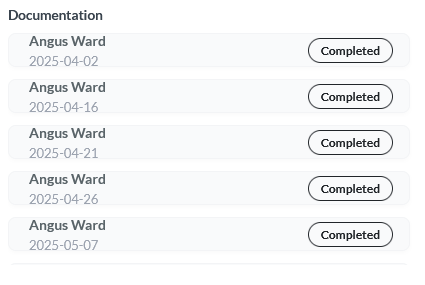
Shows a list of overdue notes and pending letters during the time period.
Intake and Forms
Total number of forms returned form for each time period in date range.
JAN Insights
JAN Insights uses AI to highlight useful trends and insights based on your active Dashboard metrics.
Low Stocks
List of stock running low or entered to have less than 0 left.
New vs Returning Patients
Total number of new patients (includes new cases for existing patients) and total number of returning patients within same case.
Online Bookings
Total number of online bookings per location.
Operational Risks
Total cancellations, DNA and unbilled appointments as stacked bars.
Payer/Funding Mix
Different payment methods from Third Party payments, this is similar to daily takings, but shows Third Party payments only.
Payments & Reconciliation
Total payments separated by payment method.
Practice Summary
Shows an overview for the Period for the practice.
Profitability Metrics
Average collection per visit, billable hours, utilised hours and average discount for invoices in line format.
Provider Productivity
Total number of appointments by Provider, within the date range.
Ready to Submit Claims
Shows the List of claims ready to submit, within selected date range.
Reminders and Confirmations
Sent delivered and failed totals SMS and email reminders for the time period.
Revenue and Trends
Total bar of revenue for all locations, and lines for each location of total revenue within the date range.
Today’s List
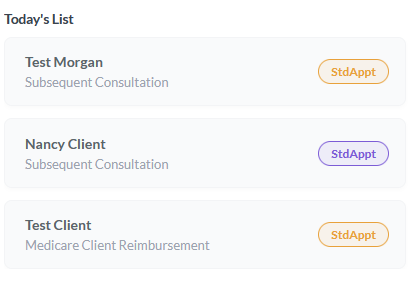
List of appointments booked to the Provider for today, this shows a unique list for each provider. This is visible only to the provider. Today's List will only refresh once per hour.
Uncompleted Notes
List of appointments with notes that have not been started, or are still as drafts from time period.