
With Nookal, it is easy to record if a Patient was referred by an existing Patient, a Contact or another source of Marketing e.g. Facebook ad. This information will be saved in the Patient Profile and used for marketing reports.
There are three main ways to record or update this information. See below for details.
When Creating an Appointment
1. Click on an available timeslot in the Calendar and create an appointment for a new or existing Patient.
2. For new Patients fill in the Patient details first, then select Create a New Case under Case. For existing Patients, select Create a New Case under Case if appropriate.
3. Under the Referrer section, click on Referred by to view Marketing Referrer options.
4. Select Contact, Patient, or Other.
Setting up Other Referrers for more details.
5. Choose the appropriate Referrer for the selected Referrer Type.
6. Add More Information if necessary.
7. Click Create Appointment.
From an Existing Appointment
1. Click on an existing appointment in the Calendar.
2. In Classic view, click Edit Case Details under Case Details.
Hot Tips

In Fresh view, click on the spanner icon.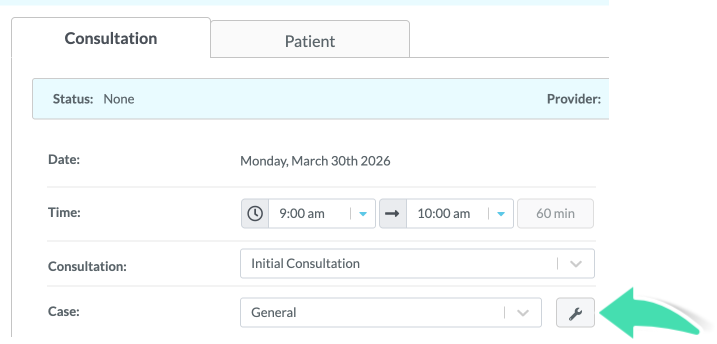
3. Follow steps 3, 4, 5 and 6 from above.
4. Click Save Changes.
From the Patient Profile
1. Navigate to the Patient Profile.
2. Click on Cases in the menu.
3. Select an existing Case to update the Referrer or click Create a New Case.
3. Follow steps 3, 4, 5 and 6 from above.
4. Click Save Changes.